For Claude Pro and Max subscribers

Check your Claude usage at a glance.

For everyone who writes, researches, studies or runs a business in Claude, not only people who code. Your 5-hour session and weekly limit, when each one resets, and a heads-up before you hit the wall, in your Mac menu bar.

Get SessionWatcher, from $6.99

Prices go up Nov 1, midnight Paris time. Prices go up Nov 1

14-day money-back guarantee

Rather try it first? Download for Mac: free for 7 days, no card.

Sign in with your Claude account: no Claude Code, no terminal. Mac app, macOS 14 or later. On a Windows PC SessionWatcher reads your sign-in from Claude Code, so it needs Claude Code installed.

Glance up: the session and the week, and when each one resets.

What the Claude usage limit is

Claude Pro and Max come with two limits at once, and they count everything you do in Claude: chat, the desktop app and Claude Code. In Anthropic's words, they “are shared across Claude and Claude Code, meaning all activity in both tools counts against the same limits.”

5-hour session
How much you can use Claude in a 5-hour session. It resets every 5 hours.
Weekly limit
A cap on the whole week, across all models, on a fixed weekly schedule. Max adds a separate weekly limit for Fable.
Shared with Claude Code
Chat, the desktop app and Claude Code draw on the same two limits. A long research chat in the morning leaves less for the afternoon.

Long conversations, large attachments, Research and web search, and the bigger models use it faster. Claude shows where you stand under Settings > Usage and warns you in the chat as you get close. Both reach you only while you are in Claude.

Sources, checked 14 October 2026: Using Claude Code with your Pro or Max plan, usage limit best practices and What is the Max plan? (Anthropic).

What SessionWatcher does
Know where you stand without asking.

Your reset time, in the menu bar
Both limits as a percentage, with the time left until each one resets. The numbers refresh about every 90 seconds, and again the moment you open the menu.
A heads-up before the wall
A notification at 70% and at 90% (or every 10%, if you prefer), so you can finish the draft or pace the rest of the day. And one more when a maxed-out limit frees up, so you know you can pick up where you left off.
Use what you paid for
The opposite problem is real too: a week that resets with a large part unused. Turn on "Tell me when I'm under-using my plan" and SessionWatcher sends one note late in the week, while there is still time to use it. Pro also projects where each limit will land at reset at your current pace.
No Claude Code, no terminal
Click Sign in with Claude and log in with your Claude account in the browser. SessionWatcher reads the usage numbers Anthropic reports for your account, never your conversations.
On your iPhone and Apple Watch
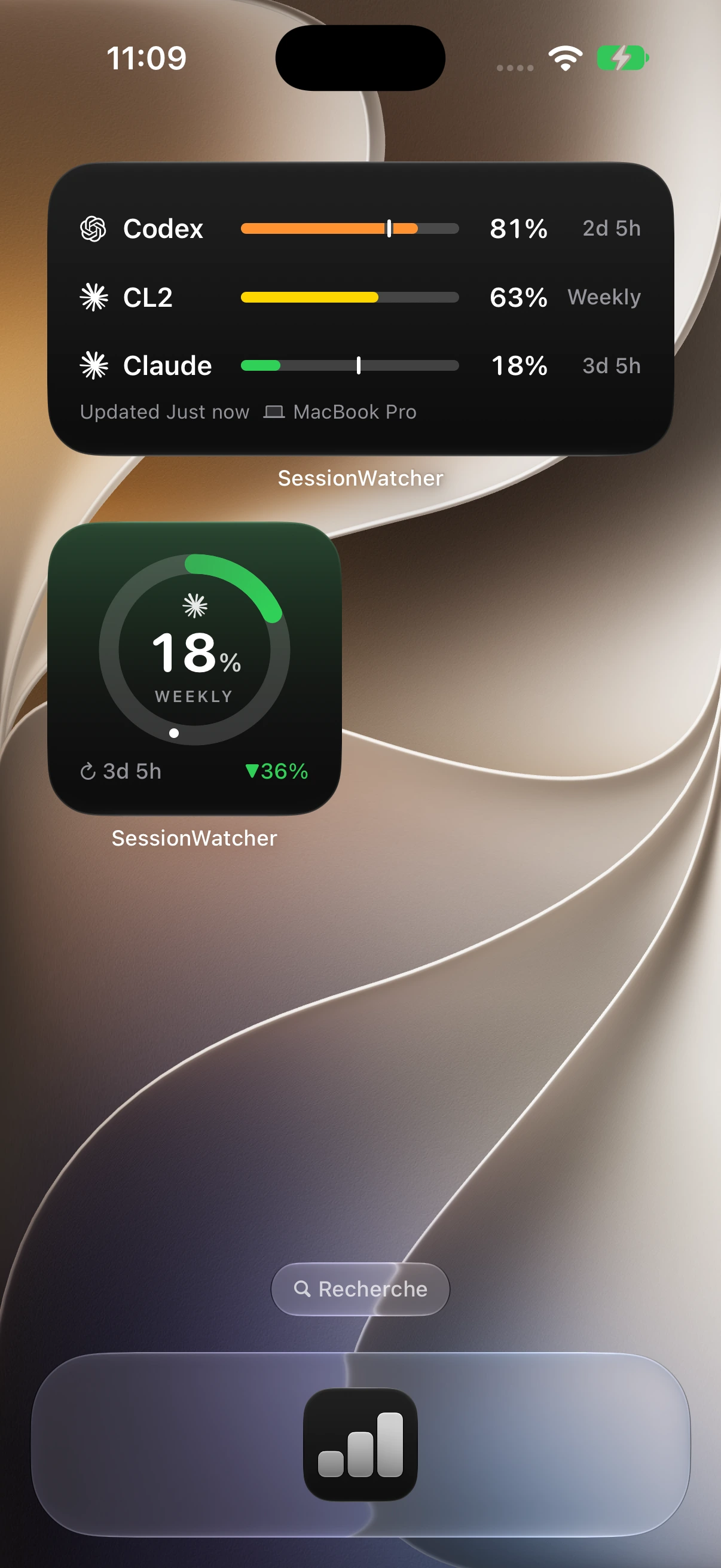
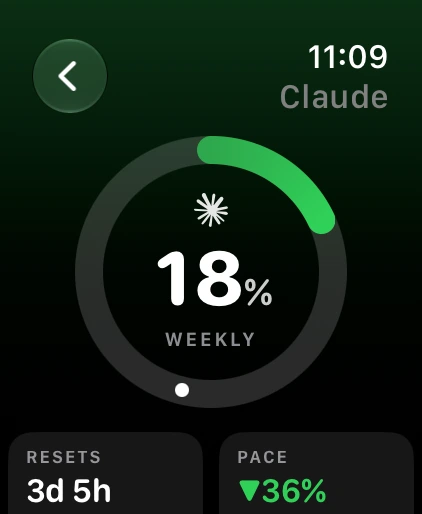
Home Screen and Lock Screen widgets, a Live Activity in the Dynamic Island and a watch face complication, mirrored from your Mac. In beta, included with every paid plan. SessionWatcher for iPhone
The same limits on your iPhone Home Screen and your watch face, synced from your Mac through your own iCloud.

You can check Claude usage for free. Here is what each way leaves out.

Paying for a usage meter only makes sense if it saves you something the free ones do not. Each one below is described from its own page, checked 14 October 2026.

Settings > Usage, in Claude

Free, built in

Good at: The exact numbers, straight from Anthropic, and a warning in the chat as you get close.

Leaves out: It answers only when you go and look. Nothing in your menu bar, on your phone or on your watch.

Claude Usage Tracker by lugia19

Free, open source, Chrome and Firefox

Good at: Usage and token counts inside the Claude page while you chat.

Leaves out: It lives inside Claude's window, so the reading is there only while Claude is open. Nothing on your phone or watch.

ClaUse Bar

Free, Mac App Store

Good at: The closest free match: session and weekly usage in the menu bar, reset countdowns and notifications before you run out.

Leaves out: Mac only and Claude only, with no iPhone or Apple Watch app (per its App Store listing).

SessionWatcher

From $6.99 one-time, 7 days free

Good at: The menu bar, alerts before the wall and when it lifts, the under-use note, and your limits on iPhone and Apple Watch. Pro covers 20 AI tools and several Claude accounts.

Leaves out: It costs money. The iPhone and Watch apps are in beta and mirror the Mac app, so they need it.

“SessionWatcher helps me wrangle the most out of my Claude account’s limits, both when I’m using too much and not enough, and gives me a fast heads up when something goes off the rails so I can correct it before it’s too late. It’s one less thing that I have to monitor by hand, and it does its job simply and attractively. Best of all, the developer is wonderfully responsive.”

Justin
“I spent four hours browsing Reddit and was overwhelmed by the number of Claude/ChatGPT limit trackers. Every app I saw was missing something I needed. SessionWatcher actually tracked every metric I wanted (token cost in USD, as well!), which made it worth the buy. Definitely the tool to go for if you want to go Pro and not miss any important info.”
Jan

Claude alone is $6.99, once. Pro covers everything.

★★★★★Loved by 1,492+ users

Prices go up Nov 1: Solo $8.99, Bundle $19.99, Lifetime $79. Midnight Paris time.

Prices go up Nov 1
Claude

Everything you need for one tool.

$6.99one-time

Pay once. Yours forever.

Until Oct 31, then $8.99. Midnight Paris time.

Coverage

  • Licensed for 1 device
  • Claude

What you track

  • 5-hour, weekly & Fable 5 limits
  • Usage rate chart + 7-day history
  • Token + cost breakdown

At a glance

  • Menu bar / taskbar modes
  • Desktop notifications

iPhone & Apple Watch

  • iPhone & Apple Watch appBeta
  • Your tools on iPhone, widgets and Apple Watch

14-day money-back guarantee

Bundle

Codex, Claude & Cursor, side by side.

$14.99one-time

3 tools · save vs buying separately

Until Oct 31, then $19.99. Midnight Paris time.

Coverage

  • Licensed for 1 device
  • Codex · Claude · Cursor

What you track

  • 5-hour, weekly & Fable 5 limits, per tool
  • Usage-rate chart + 7-day history
  • Token + cost breakdown

At a glance

  • Menu bar / taskbar modes
  • Desktop notifications

iPhone & Apple Watch

  • iPhone & Apple Watch appBeta
  • Your tools on iPhone, widgets and Apple Watch

14-day money-back guarantee

Best Value
Pro

Every tool, plus serious power-user features.

$24/yr

just $2/mo, billed annually

Coverage

  • Up to 5 devices, Mac or Windows
  • Every supported tool, plus any we add later

What you track

  • 5-hour, weekly & Fable 5 limits
  • Usage-rate chart
  • 90 days of history
  • Token + cost breakdown

At a glance

  • Menu bar / taskbar modes
  • Desktop notifications
  • macOS widgets

iPhone & Apple Watch

  • iPhone & Apple Watch appBeta
  • Every tool and account on your wrist
  • Claude & Codex update on iPhone while your Mac sleeps

Power-ups

  • Know which tool to switch to
  • Multi-account for Claude & Codex

14-day money-back guarantee

Profor Teams

One subscription for your whole team.

$40/seat/yr

2 months free · 3-seat minimum

Coverage

  • Their work Mac, plus a spare
  • Every supported tool, same as Pro

Included

  • Everything in Pro, for every seat
  • iPhone & Apple Watch appBeta

For your team

  • One license key per teammate
  • Reassign a seat when someone leaves
  • Add seats as the team grows
  • One invoice for every seat

Total $200/yr

Keys by email instantly · Need an invoice?

Claude
$6.99one-time
  • Tracks Claude
  • Live limits, usage and cost
  • 1 device

Upgrade later, pay only the difference

Bundle

$14.99one-time
  • Tracks Codex, Claude and Cursor
  • Live limits, usage and cost
  • 1 device

Upgrade later, pay only the difference

Best Value
Pro
$59one-time
  • Every tool, and every new one
  • Up to 5 devices
  • Multi-account and widgets

Prices go up Nov 1: Solo $8.99, Bundle $19.99, Lifetime $79. Midnight Paris time.

14-day money-back guarantee

“The one time payment is the most worth it money I've spent this year.”
★★★★★Matthew Sherman

Buying for a team? Pro for Teams, $40 per seat a year →

Questions about Claude usage

In Claude, open Settings > Usage. It shows how much of your 5-hour session you have used, the time left in it, and when your weekly limit resets. In Claude Code, /usage shows the same. SessionWatcher keeps those numbers in your Mac menu bar, so you see them without going to look.

Yes. Anthropic says the limits "are shared across Claude and Claude Code, meaning all activity in both tools counts against the same limits." SessionWatcher shows that one shared limit, whichever of the two you use.

Not on a Mac. Click Sign in with Claude in SessionWatcher and log in with your Claude account in your browser. If you already use Claude Code, the app can pick up that sign-in instead.

No. It reads the usage numbers Anthropic reports for your account: percentages and reset times. Your chats, files and projects are not read or uploaded.

Not for chat. Token counts and cost come from Claude Code's own logs on your Mac, so they appear only if you use Claude Code. For chat you see your share of the 5-hour and weekly limits, which is the number that decides whether you get locked out.

Only if you want it to be. Solo is $6.99 and the Bundle is $14.99, both one-time. Pro is $59 one-time ($79 from November 1, Paris time) or $24 a year. Solo covers Claude on one computer. Pro adds every other AI tool, several Claude accounts, the usage forecast and up to 5 devices.

Yes. Pro Lifetime is $59 until October 31, 2026 and $79 from November 1, 2026, starting at midnight Paris time (October 31, 23:00 UTC, 7 PM in New York and 4 PM in San Francisco). Solo is $6.99 until October 31, then $8.99, and Bundle is $14.99 until October 31, then $19.99, at the same instant. Pro Annual stays $24 a year, and existing licences keep working. Upgrading to Lifetime from Solo, the Bundle or Pro Annual still credits what you paid; from November 1 the difference is $20 more.

Fourteen days. Email contact@sessionwatcher.com within 14 days of buying and you get a full refund.

Stop opening Settings to check.
Let the menu bar tell you.

Get SessionWatcher, from $6.99

Prices go up Nov 1, midnight Paris time. Prices go up Nov 1

14-day money-back guarantee

Rather try it first? Download for Mac: free for 7 days, no card.

★★★★★Loved by 1,492+ users